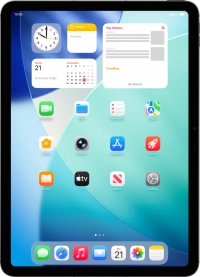
Apple iPad Air 11 (M3) (2025)

Apple iPad Air 11 (M3) (2025)

iPadOS 26

Use Dock on your Apple iPad Air 11 (M3) (2025) iPadOS 26

Read help info

Using Dock, you can gain quick access to the most used applications. To use the functions, you need to select settings for Dock.

Slide your finger upwards starting from the bottom of the screen to open Dock.
Step 1 of 5

1. Open Dock

Slide your finger upwards starting from the bottom of the screen to open Dock.

Slide your finger downwards on Dock to minimise it.
Step 2 of 5

2. Minimise Dock

Slide your finger downwards on Dock to minimise it.

To add an application to Dock, press and hold the required application and drag it downwards to the left side of Dock.
Step 3 of 5

3. Personalise Dock

To add an application to Dock, press and hold the required application and drag it downwards to the left side of Dock.

You can set the left side of Dock to contain your favourite applications.
To remove an application from Dock, press and hold the required application and drag it upwards from Dock.
Step 4 of 5

3. Personalise Dock

To remove an application from Dock, press and hold the required application and drag it upwards from Dock.

You can only remove applications you've added to Dock yourself.
Press the required application in Dock.
Step 5 of 5

4. Open new application from Dock

Press the required application in Dock.

1. Open Dock

Slide your finger upwards starting from the bottom of the screen to open Dock.

2. Minimise Dock

Slide your finger downwards on Dock to minimise it.

3. Personalise Dock

To add an application to Dock, press and hold the required application and drag it downwards to the left side of Dock.
You can set the left side of Dock to contain your favourite applications.
To remove an application from Dock, press and hold the required application and drag it upwards from Dock.
You can only remove applications you've added to Dock yourself.

4. Open new application from Dock

Press the required application in Dock.

Get information on...

Or choose...

Another device